
How to change the Ships in your Fleet
More Sea of Conquest
A common question from Sea of Conquest players is how to make changes to the line up of ships that you have in your fleet. As you level up and unlock fleet slots and you gain most ships to add to it you will find that you want to make changes to which ones you have sailing with your flagship into battles. This is called your formation.
Why to change your fleet formation
Each of the ships will have different skill and benefits to you. As you pass though each season in the game new ships are unlocked which you may be able to gain powerful versions of and want to then use them instead of your current lineup.
Each ship also suits different heroes so as your hero lineup changes you may want to try out different ships with your heroes to see if they give you an advantage.
It makes sense to try out each ship you have to see what works for you.
How to adjust your Fleet Lineup
Currently the method to change the line up of your fleet ships is not obvious, which is why we get a lot of questions about it. Possibly It will be change in the future but for now here is our guide to making changes to the fleet.
The fleet line up is found in the Formation screen. To start look on the main screen view when you are at sea, on the right hand side you will see a panel that shows the ships in your fleet. This does not appear when you are in the ship cabins area or in the map view.
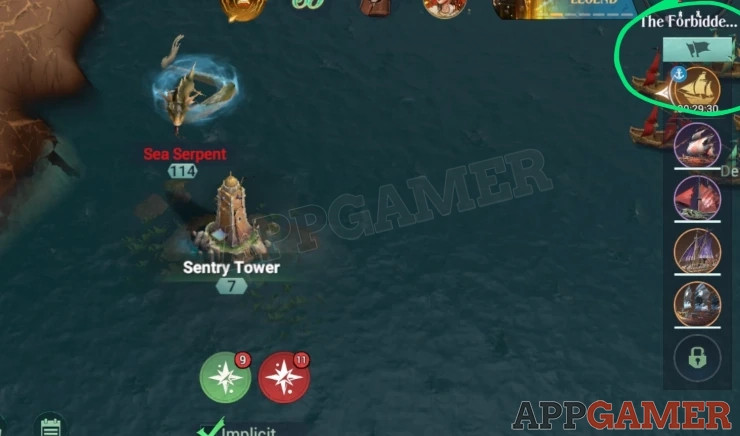
At the top of the panel (just below the mini map) is a small icon that currently shows 2 flags, this has changed in the past but it has so far always been above the list. Tap on this to end the Formation menu.
Formation
In this menu screen you will see each of the ships that you have equipped and you can select them on the right to see the lineup of heroes to make changes to them.
You can tap on the heroes to change who is on the ship and you can tap on the ship equipment items to make changes to those as well.
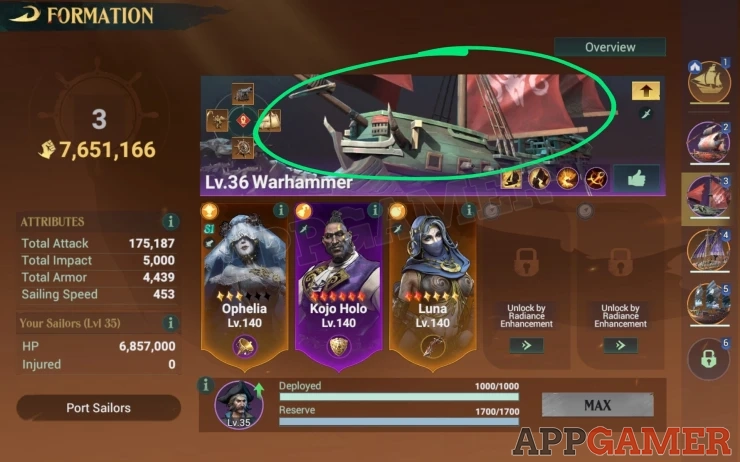
To edit the line up though you need to select the position you want to adjust, e.g. 3 and then tap on the ship banner at the top (but not on any of the icons). Tap in the area shown in the image above. This will take you to a selection screen.
In this screen you can deselect the current ship to drop it from the line up and/or select a new ship from your available list to place it into this position in the fleet formation.
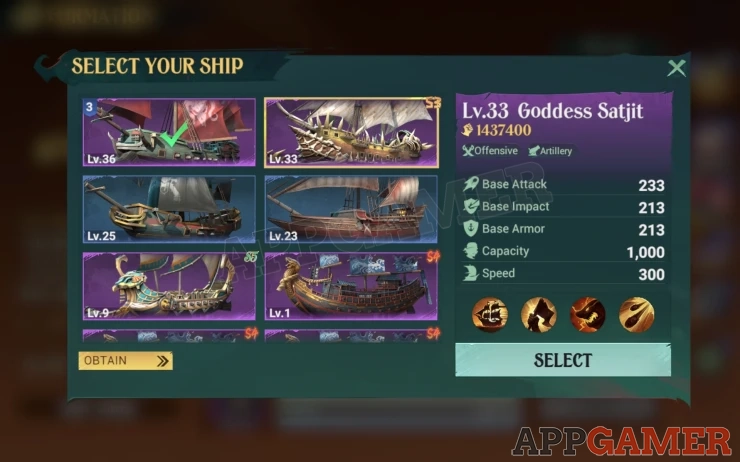
If you want to swap positions of two ships in your fleet you will need to deselect one first to then allow you to add it to another slot.
Hopefully this guide will help you understand how to edit the formation of your fleet ships. If you have any other questions about Sea of Conquest please head to the Answers Page to ask there.
We have questions and answers related to this topic which may also help you: Show all
 With 20 years of experience in creating video game content for the internet and over 30 years as a gamer, Mark is now a passionate mobile App Gamer. Loving a challenge, he is always ready to get stuck in to both survival builders and puzzle solving games. He has been providing content for AppGamer since 2014.