
Campaign
Idle Heroes Guide
The Campaign is the main part of the game, it is split into 8 world each with 5 levels of difficulty. You'll need to complete all 8 world in normal difficulty before unlocking the next highest difficulty level, then the same again to get to the next difficulty level etc..
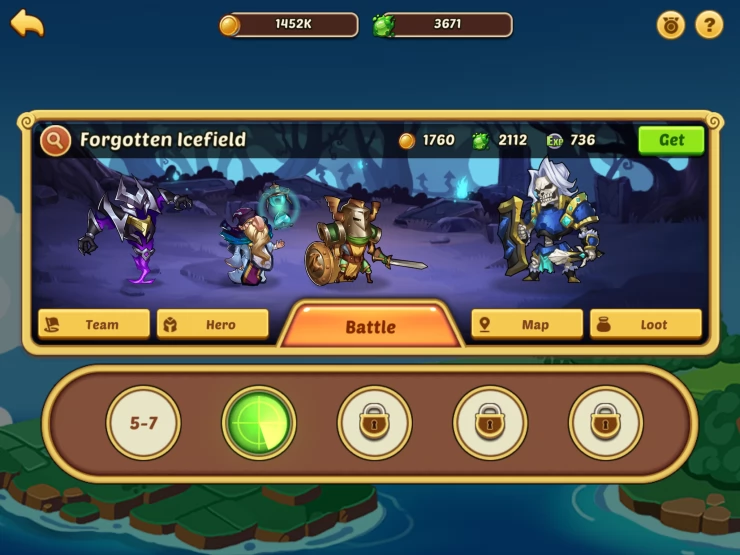
Auto Battle Animation
The Campaign section also has a continuous auto battle feature... You see that animation well, that is gaining you gold, upgrade orbs, loot and EXP. you just have to collect it with the GET button... The other bit of good news is this works for some time when the game is off, so come back every now and again to collect it all. If you've been stuck on a level, then the material you collect for free here, may be enough to upgrade your heroes and get you to the next level.
Team
Here is where you select your team, in the beginning you'll notice that only some slots are unlocked, as you progress in the game, more slots will be unlocked for you to place your heroes. IT also shows your team's overall power score... It's that number to the right of the big fist.
Hero
The hero tab just basically lists all of your heroes and offers a quick way to take a look at any of your heroes and upgrade their levels or change their equipment. You can also use the icons across the top to filter for particular hero types.
Map
The map shows you where you are in the world, you can't go and replay the levles you've already completed though to spam more stuff :(
Loot
This button will have a red dot on it when there is some loot to collect.
We have questions and answers related to this topic which may also help you: Show all